As Support teams work with Engineering towards resolving customer issues, they face a number of challenges while navigating between Salesforce and Jira. A key challenge is the lack of access to Jira data in Salesforce Reports. Even manually updating Case records with Jira Issue data is not sufficient to generate reliable up to date reports that can help them track resolution times for Cases in Engineering against SLA commitments. This negatively impacts customer satisfaction.
zAgileConnect, through its powerful integration between Salesforce and Jira, brings Jira data into Salesforce in real time. Combine Jira Issues with Cases using zAgileConnect. Support teams can easily create Reports and Dashboards that reflect up to date status of Cases in Engineering, measure the performance of Engineering teams vs SLA commitments, and provide valuable insights to Sales and Account Management in their continuous efforts towards improving customer satisfaction.
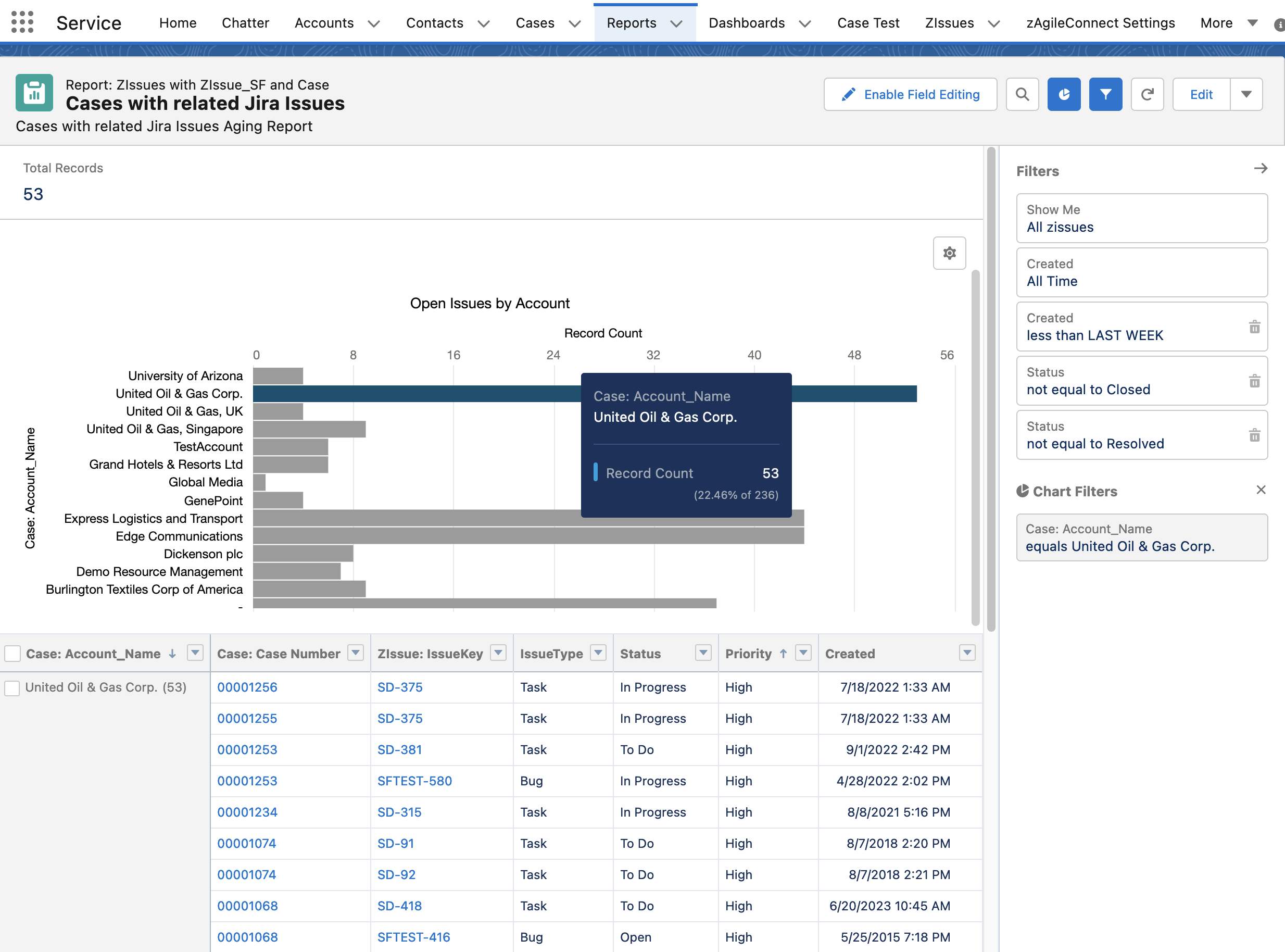
Salesforce Report with zAgileConnect: Detail of Salesforce Cases and Corresponding Jira Issues
Learn more about how to combine Jira Issues with Cases and accessing Jira data by watching introductory videos of <4 minutes of how zAgileConnect can help customer support teams work more efficiently and collaborate more effectively.
Try zAgileConnect for a 30-day free trial on the Salesforce AppExchange.