

Salesforce & Jira Integration
For seamless support and engineering collaboration
Connect Salesforce and Jira with zAgileConnect to enable real-time, bi-directional sync between support and engineering.
Resolve issues faster, improve cross-team visibility, and deliver better customer experiences.
- Bi-directional integration
- Real-time resolution tracking
- Easy setup in under an hour
- Improve SLA compliance & customer satisfaction
- 5-star rated and trusted by global enterprises
Start syncing Salesforce and Jira in minutes →
Trusted by the world’s largest teams — comprehensive Salesforce–Jira integration.
zAgileConnect delivers enterprise-grade, bi-directional Salesforce Service Cloud ↔ Atlassian Jira integration — feature-rich and ready out of the box. Install and deploy in under an hour to enable deep, seamless interoperability that keeps Salesforce cases and Jira issues in sync, surfaces real-time status and context, and streamlines cross-team collaboration between support, engineering, and product. Trusted by global enterprises and rated 5 stars on the AppExchange, zAgileConnect helps support teams resolve issues faster, reduce handoffs, and maintain end-to-end visibility.
CUSTOMER SUPPORT
- Work efficiently on cases
- Track case status and corresponding Issues
- Collaborate easily within support and with engineering, including escalations
- Respond faster to customer needs to improve customer satisfaction and comply with service-level agreements (SLAs)
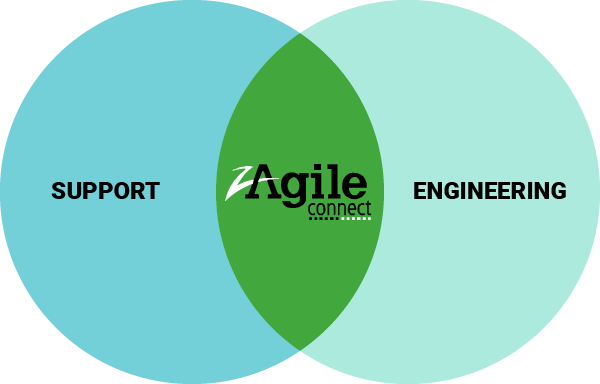
ENGINEERING
- Easily gain context of issues with respect to customer cases
- Efficiently collaborate and align with support in meeting customer needs
- Provide support teams with faster resolution to customer needs
What is zAgileConnect?
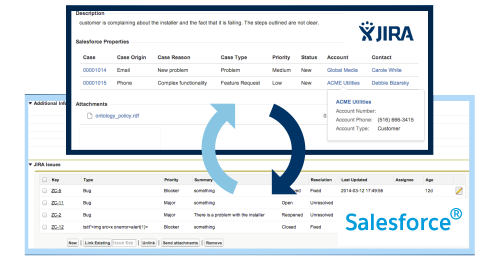
zAgileConnect allows for bidirectional exchange of information between Salesforce and Jira
By integrating Salesforce and Jira, zAgileConnect improves coordination between teams. It enables efficient collaboration and tracking as teams work on various customer-centric tasks.
The goal of this integration of Salesforce and Jira is to bridge the gap between Sales, Support, and Engineering and allow teams to work more efficiently towards resolving customer-related tasks.
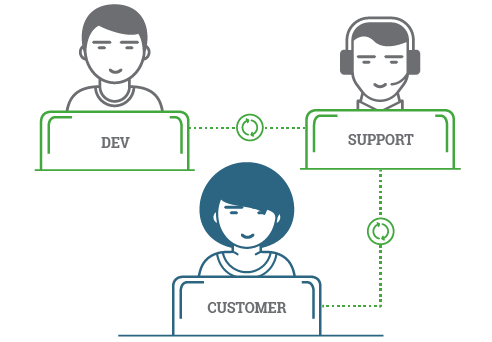
zAgileConnect allows support teams to work more efficiently with product teams
As support calls are captured, help desk can create specific issues in JIRA for triage by engineering. Relevant issues may be further elaborated, prioritized and scheduled for delivery either as product patches or formal releases. Regardless of the resolution steps, help desk stays in sync throughout the resolution processes to ensure timely and accurate feedback to customers. The integration reduces the need for support teams to switch back and forth across applications in an attempt to catch up to the resolution state of each case.
⚡ Why zAgileConnect vs. Other Salesforce Jira Integration Tools?
| Feature | zAgileConnect | Typical Competitors |
|---|---|---|
| Bi-directional sync | ✅ | ✅ Strong on data sync, limited on true integration |
| Real-time updates | ✅ | ⚠️ Limited |
| No-code configuration | ✅ Install in < 1 hour | ❌ Often complex |
| Enterprise scalability | ✅ Scales to thousands of users across multiple Salesforce and Jira instances |
⚠️ Varies |
| Ease of implementation | ✅ Fast setup; fully functional out-of-the-box | ❌ Slower |
Features & Benefits
Everything support and engineering teams need to stay aligned in Salesforce and Jira.
zAgileConnect combines real-time sync, embedded Jira workflows in Salesforce, and enterprise-ready flexibility to help teams escalate faster, collaborate better, and resolve issues with full visibility.
| Bi-Directional Sync | Keep Salesforce Cases and Jira Issues aligned with real-time, two-way synchronization so support and engineering always work from current information. Reduce manual updates, missed handoffs, and resolution delays. |
| Work with Jira Inside Salesforce | Search, link, create, and manage Jira issues directly from Salesforce using embedded Lightning components. Your agents stay in one workspace instead of switching between tools. |
| Real-Time Resolution Tracking | Track issue updates, workflow transitions, and related activity in Salesforce so support teams always know where engineering work stands. Improve response times and SLA performance with better visibility. |
| Shared Comments & Attachments |
Share comments, attachments, and case context between Salesforce and Jira to keep everyone aligned and reduce duplicate effort. Collaborate more effectively across support, engineering, and product teams. |
| Automation with Salesforce Processes |
Trigger Jira actions from Salesforce workflows to streamline escalations and remove repetitive manual steps. Standardize how issues move from customer case to engineering action. |
| Enterprise-Ready Flexibility | Support complex use cases with many-to-many Case–Issue relationships, multiple Jira instances, multiple Salesforce orgs, and Jira Service Management integration. Built to scale beyond basic connectors. |
⭐ Why Choose zAgileConnect for Salesforce & Jira Integration?
zAgileConnect is a 5-star-rated Salesforce-Jira integration solution trusted by global enterprises to improve collaboration between customer-facing teams and engineering.
Key benefits
- 🔄 Bi-directional Salesforce-Jira sync
- ⚡ Real-time updates across systems
- 🤝 Streamlined support-to-engineering workflows
- 🔐 Enterprise-grade security and scalability
- ⚙️ Fast installation with full out-of-the-box functionality
See it in action —
Watch the zAgileConnect overview and demo, including the latest Salesforce-Jira integration features
Are you ready to get your support staff, developers and sales on the same page to support your customer needs?

Seamless Thread for Issues
“We have been using the zAgile connector for several months now and its been really useful for ensuring we have an integrated flow from Salesforce to JIRA and from our support team to our dev team. It also enables key dashboard data used for managing our teams. Its been easy to install and configure and the support has been great.”
CARIN LOCKHART, PROGRAM MANAGEMENT CONSULTANT, PRYSM